Roseville's Power Flex Program
What is the Power Flex Program?
- PowerFlex is Roseville Electric’s voluntary Demand Response Program utilizing brief adjustments on participant’s smart thermostats to conserve energy during times of peak demand. Customers are rewarded with a $25 bill credit for enrollment and a $25 annual bill credit for participating.
How do I enroll?
To be eligible to enroll, you must:
- Be an active Roseville Electric Utility customer with electric service in your name.
- Use a qualified internet-connected smart thermostat. (See list below)
- The purchase of a smart thermostat does not guarantee participation in the program.
- Roseville Electric Utility reserves the right to limit the maximum number of customers that are enrolled in the Power Flex program. Customers are not guaranteed a right to participate in the program
Business customer eligibility
-
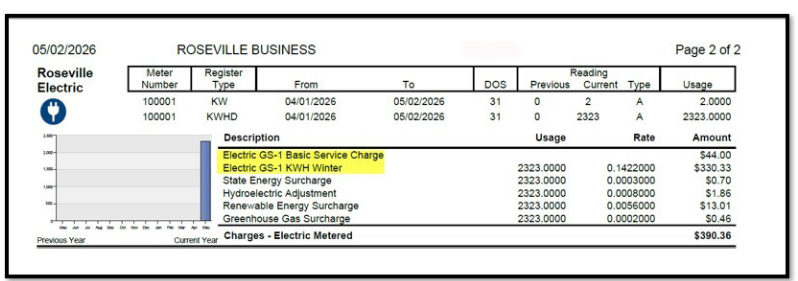
Small commercial customers interested in enrolling in our Power Flex Business program, must fall within the GS-1 customer class - this classification can be confirmed by checking your utility bill (see highlighted section of the bill example below).
How do I enroll
-
Enrollment can occur from your thermostat app or at our enrollment site https://greatergrid.com/enroll/programs/thermostats/roseville.
- If you have an installed eligible thermostat, please select your thermostat among the list of eligible models. Then, click the “Enroll” button to go to your thermostat’s enrollment site where you will follow a series of simple steps to enroll.
- Once your eligibility is confirmed by Roseville, you will be enrolled in the program. You will receive notification on your enrollment status via email using the address provided in your account registration.
Eligible thermostats
|
Provider |
Approved Thermostats |
|---|---|
|
Alarm.com |
Trane ComfortLink Control; RCS Z-Wave Communicating Thermostat; GoControl Z-wave Thermostat; Alarm.com Smart Thermostat; 2GIG Z-Wave Plus™ Battery Powered Thermostat; Trane Z-Wave Thermostat; Linear Thermostat; Smart Thermostat HD (ADC T40K-HD); ADC T3000, ADC T2000, ecobee Thermostat, Honeywell T6 |
|
Amazon |
Amazon Smart Thermostat |
|
ecobee |
ecobee3, ecobee3 Lite, ecobee4, ecobee Smart Si, ecobee Smart, ecobee SmartThermostat with voice control, Smart Thermostat Premium, Smart Thermostat Enhanced, Smart Thermostat Essential |
|
Sensi |
Sensi™ Wi-Fi Programmable Thermostat, Sensi Touch Wi-Fi Thermostat, Sensi Lite Smart Thermostat, Sensi Touch 2 Smart Thermostat |
|
Honeywell Home |
Wi-Fi T5+ Smart Thermostat, Wi-Fi T6 Pro Smart Thermostat, Wi-Fi T9 Smart Thermostat, Wi-Fi T10 Smart Thermostat |
|
Honeywell TCC |
Wi-Fi Smart Color Thermostat, Wi-Fi 7-Day Programmable Thermostat, Wi-Fi 9000 7-Day Programmable Thermostat, Wi-Fi 9000 Smart Thermostat, Wi-Fi 7-Day Programmable Smart Thermostat, Wi-Fi VisionPro 8000 Smart Thermostat, Wi-Fi Round Smart Thermostat |
|
Google Nest |
Google Nest Learning Thermostat (4th gen), Google Nest Learning Thermostat (3rd gen), Google Nest Thermostat, and Google Nest Thermostat E |
Enrollment bill credit
- Participants will receive a one-time $25 bill credit within 90 days of successfully enrolling in the program.
Participation Bill Credit
- The $25 bill credit for participating in the May-Sept season will be issued every November.
- Participants must be currently enrolled in the program on November 1st of each year to receive the annual participation incentive.
- The enrollment incentive and the annual participation incentive are limited to one per household/ per business location. You will not receive multiple incentives for enrolling multiple thermostats per location.
- Locating Bill Credit: Credits will be listed on your bill as a "Power Flex Enrollment Credit" or "Power Flex Annual Credit.”
- Early Disenrollment: To receive the annual $25 credit, customers must remain enrolled in the PowerFlex program throughout the year.
Thermostat replacements
If I replace my old thermostat with a new model, will I receive an additional enrollment incentive?
- No, since you have already received an enrollment incentive, you will not receive an additional one. However, if you enroll your new thermostat, you can continue to be eligible for the annual participation incentive.
Notifications
- Events may start and end without notification. An image may appear on your thermostat or web/mobile application letting you know when an event is underway. Some thermostat providers may send notifications prior to an event.
Event time frames
Event Season
- May 1ST- Sept 30th.
Event Duration
- Events will typically run for 1 hour but may last up to 4 hours in extreme conditions.
Event Times
- Events may be called anytime between 6am-10pm.
Excluded times
- Weekends and Holidays will be excluded except during extreme grid emergencies.
What to expect from a Power Flex event.
- When an event is called, you’ll maintain control and can easily opt out by adjusting the temperature setting from your thermostat or thermostat app on your phone.
Degree Change
- Thermostat settings will be raised 4 degrees. Once an event ends, your thermostat will return to its previous set point.
How warm might my home/business get?
- This depends on your thermostat temperature setting prior to the event. Temperatures in your home or business may not increase the full 4 degrees depending on the event duration as well as your home/building’s efficiency and insulation factors. If the temperature in your space rises beyond 4 degrees, your system will activate to lower the temperature regardless of if the PowerFlex event is still going. You can always opt out on your thermostat or app if your space becomes uncomfortable at any point.
What if my air conditioning is off?
- If your air conditioner is not in cooling mode, your thermostat will not be called into an event and the temperature setting will not be raised.
Terms and Conditions
|
Provider |
Terms and Conditions |
|---|---|
|
Alarm.com |
|
|
Amazon |
|
|
ecobee |
|
|
Sensi |
|
|
Honeywell Home |
|
|
Honeywell TCC |
|
|
Google Nest |
What if I have additional questions about the program?
Please email powerflex@energyhub.net or contact Roseville Electric Utility at (916) 79-POWER, or (916) 797-6937.
What should I do if I no longer want to participate?
- Single event opt outs are always available through adjusting the temperature setting on your thermostat or thermostat app.
- If you should want to formally unenroll from the PowerFlex program and any future thermostat adjustment events that may be called, simply email powerflex@energyhub.net requesting to end your participation in the program. Once you have been taken off the program, your thermostat(s) will no longer be enrolled, and you will not receive the annual participation incentive.
The City of Roseville does not approve or endorse any one device or vendor over another and is not responsible for vendors’ services and products.
Participation in the Power Flex program is not guaranteed. A maximum number of participants may result in some applications being declined.
The Roseville logo is owned by the City of Roseville.
Amazon and all related marks are trademarks of Amazon.com, Inc. or its affiliates.
Google, Nest Thermostat, Nest Learning Thermostat and Nest Thermostat-E are trademarks of Google LLC.